About This Template
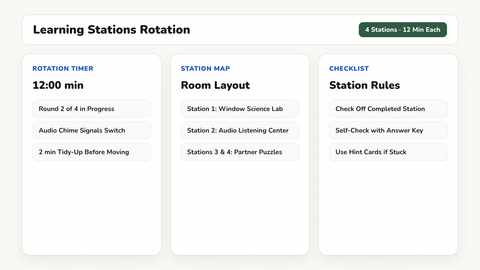
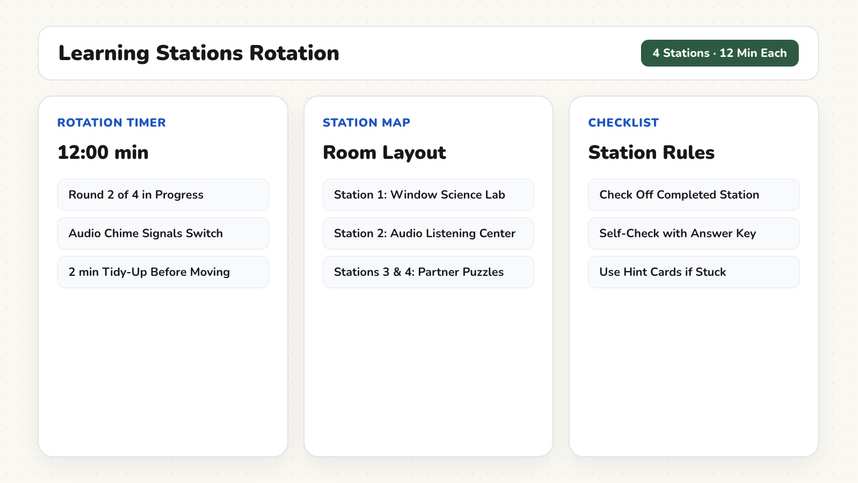
Station rotations keep students engaged across varied learning tasks. This template displays all four center locations, a student checklist, timed rotation blocks with auditory cues, and debrief prompts.
How It Works
- Station Overview & Objectives (8 Minutes). All four learning stations display on the board with locations and concise task descriptions. This central directory remains visible during work periods, eliminating repetitive questions about station directions.
- Review Checklist Expectations (5 Minutes). The second slide outlines rotation procedures: begin at your assigned station, complete your task checklist, and return center materials before rotating. Students may work at their own pace, but all four centers must be visited.
- Timed Rotations (48 Minutes). The third slide sets the Timer to twelve minutes per rotation, with a gentle warning signal at ten minutes. The Traffic Light stays on Yellow for collaborative conversation volume. An automated chime cues clean transitions without teacher shouting.
- Debrief & Formative Checks (15 Minutes). The fourth slide uses the Random Name Picker to choose one student per station. Three reflection prompts keep student shares targeted and structured.
- Classroom Clean-Up (4 Minutes). Each student group returns their final station to its original organized state. Resetting materials is built directly into the schedule rather than left as an afterthought.
Adaptations & Variations
If your class period is shorter, run three stations instead of four and extend each rotation to fifteen minutes. Removing one center entirely is far better than cutting rotation times too short, as unfinished tasks create unnecessary student frustration.
In lower elementary classrooms, substitute text descriptions with visual station symbols and set the Work Phase widget to partner work so students always have peer support. Use our Group Generator to balance teams ahead of time.
In special education classrooms, limit stations to three visual learning centers with clear icon cards. Lengthen rotation times and disable automated chimes; a calm verbal transition notice preserves classroom equilibrium much better than unexpected audio tones. Additional classroom strategies are highlighted in our guide for Special Education.
In secondary classrooms, students can post their completed station findings on anchor charts around the room for a quick gallery walk.
For cooperative structures where every student masters one specific section, explore our Jigsaw Activity template. For open-ended mathematics tasks, use our Math Talks template.
Preparation
- Quick setup. Customize the four station task descriptions in the text widget to match your lesson plan.
- Arrange learning materials at the four physical classroom tables before students arrive.
- Print student rotation checklists or recording sheets.
- Test your classroom audio volume so transition chimes are clearly audible across the room.
Frequently Asked Questions
Are these whiteboard templates free?
Yes. All templates and all classroom tools are completely free to use without an account. Premium costs $2.49 per month and syncs your custom board layouts across devices, with the first month free. Student teachers receive permanently free Premium with verification.
Can I run three stations instead of four?
Yes. Adjust the text widget to show three stations and increase the timer to fifteen minutes. Running three complete stations is far better than rushing four.
Does the timer sound an alert between rotations?
Yes. The timer includes an audible chime and visual warning when time expires, signaling rotation without requiring teachers to raise their voices.