
Classroom Poll
Collect live votes, quick opinion polls, and visual survey results on screen.
Asking for a quick show of hands often leaves hesitant students looking around before raising an arm. The classroom poll gathers student choices clearly on your display with live bar charts or smiley scales. Everyone sees the collective opinion without pressure or singled-out answers.
“Classroom Poll” is a tool by ClassHelper, the free digital whiteboard for teachers. It runs directly in your browser with no account required and servers in Germany.
Abstimmung direkt ausprobieren
Frage stellen, Typ wählen und Antworten anklicken. Ergebnisse lassen sich live als Balken, Kreis oder Ring anzeigen oder bis zum Schluss verbergen.
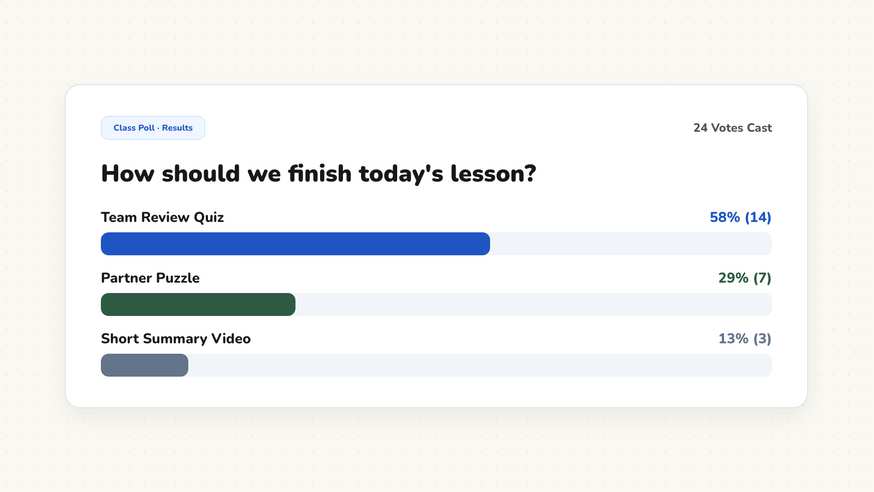
How the Classroom Poll works
The Classroom Poll turns quick check-ins and informal surveys into engaging, high-visibility classroom moments. Designed for whole-class displays, it lets educators collect student input quickly without having everyone log in on separate devices.
Teachers enter a question and corresponding answer choices. As votes are registered, dynamic bar charts or emoji scales update immediately, turning abstract opinions into visible data that prompts deeper class discussions.
Step by step
- Open ClassHelper on your interactive whiteboard and add the Poll card from the tool menu.
- Select your preferred question format, such as Multiple Choice, True or False, or Smiley Scale.
- Enter your discussion question and list possible response choices beneath it.
- Invite students to tap their choice on the interactive board or tally hands together as a class.
- Reveal the final bar chart to analyze student perspectives and spark classroom conversation.
Using Classroom Poll in the classroom
Checking for prior knowledge. Before launching a new science or history unit, run a multiple-choice diagnostic poll. Instant visual results show what students already know and highlight common misconceptions before direct instruction begins.
Formative mid-lesson temperature checks. Pause halfway through complex problem sets and ask students how confident they feel using a quick smiley-scale poll. If many students select the middle option, you know it is time for a re-teaching moment.
Democratic class decisions. Let students vote on which reading passage to explore first, where to sit for group study, or which game to play during Friday review periods. Experiencing fair voting reinforces community trust.
Ethical and literary debates. Pose provocative open questions during literature or civics lessons. Viewing anonymous aggregate votes allows reluctant speakers to see that others share their perspective, encouraging lively, inclusive discussion.
Frequently asked questions about Classroom Poll
Is the classroom poll tool free to use?
Yes. The classroom poll is completely free and launches instantly in your browser without requiring an account or student sign-ins.
Do students need individual devices to vote?
No. Students can come up and tap their choice on the interactive touchscreen, or teachers can tally a show of hands and enter votes directly onto the board.
Does the poll protect student privacy?
Votes are completely anonymous and aggregate into overall counts. We use Stripe Payments Europe (Dublin, Ireland) to process payments. Only billing data goes there, never student or lesson data.
Can I hide poll results until everyone has voted?
Yes. You can keep the result bars hidden while votes are being recorded so earlier responses do not sway later decisions.
What poll question formats are available?
You can choose between multiple-choice options, true or false questions, emoji happiness scales, and open reflection prompts.
How student and classroom data is protected is detailed in our ClassHelper privacy policy.