
Homework Board
Display daily homework assignments and deadlines clearly on your screen
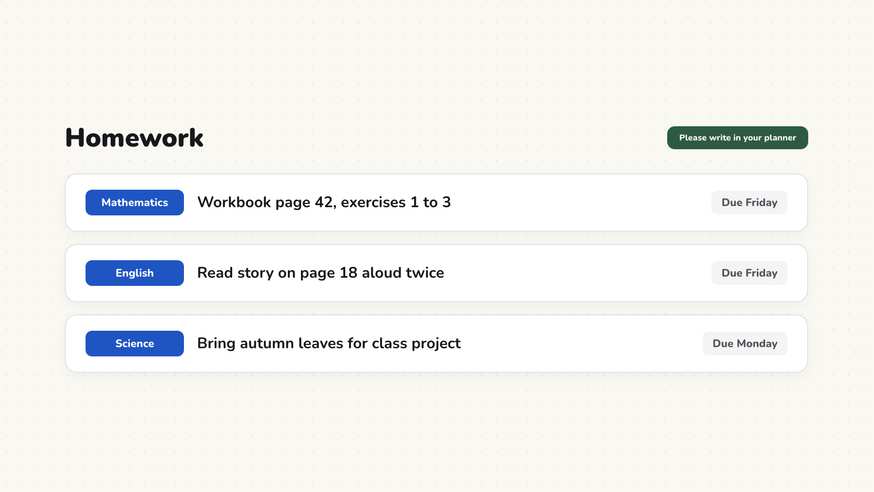
The bell is about to ring, homework is scribbled on a chalkboard corner, and somebody wipes it off before everyone finishes writing. The digital homework board keeps assignments clearly visible on your screen, complete with subject tags, page numbers, and exact due dates.
“Homework Board” is a tool by ClassHelper, the free digital whiteboard for teachers. It runs directly in your browser with no account required and servers in Germany.
Hausaufgaben direkt ausprobieren
Notiere Hausaufgaben für den Nachmittag, lege Fälligkeiten per Klick fest und schalte in die lesefreundliche Schüleransicht für die Klasse.
How the Homework Board works
The Homework Board provides a dedicated, high-visibility area on your classroom screen for tracking daily assignments and upcoming project due dates. Rather than squeezing homework notes into chalkboard margins where they risk being accidentally erased, teachers project a structured, readable board widget throughout the final lesson period.
Each homework item includes the academic subject, assignment details such as textbook page numbers, and the required completion date. High-contrast typography ensures students in the back row can copy tasks accurately into their physical planners or digital notebooks before leaving the room.
Step by step
- Launch your ClassHelper board on your classroom display and add the Homework Board widget from the tool catalog.
- Click Add Assignment to create a new task row and enter the specific exercise instructions.
- Select the relevant subject icon from math to language arts to help younger learners identify their books.
- Set the submission deadline, choosing the next school day or an upcoming project due date.
- Keep the board active during afternoon wrap-up and check off completed items as needed.
Using Homework Board in the classroom
End-of-period planner routines. Display the homework board during the final five minutes of class. Establishing a calm, consistent routine where students copy tasks into agenda books before packing backpacks prevents forgotten binders and missed assignments.
Multi-subject elementary schedules. Elementary educators teaching several core subjects can display math exercises, spelling lists, and reading logs together on one organized screen. Color-coded subject tags make it easy for students to pack the right folders.
Differentiating long-term and short-term work. Sort assignments chronologically so tomorrow’s reading check appears on top while next week’s science poster stays visible below, reinforcing time management and long-term planning habits.
Pairing with QR codes for digital materials. Place a Classroom QR Code beside an online research task. Students scan the link using classroom tablets before leaving, bookmarking web materials directly on their personal devices.
Frequently asked questions about Homework Board
Is the Homework Board free for classroom teachers?
Yes. The homework board is completely free to open directly in your browser without requiring an account or subscription.
Where are homework tasks and subject notes stored?
Assignments you type remain stored locally on your device in browser memory. When signed in, board data syncs to secure servers in Germany. We use Stripe Payments Europe (Dublin, Ireland) to process payments. Only billing data goes there, never student or lesson data.
Can students view the homework board from home?
The board is designed as an in-class display widget for student planners. If you provide digital worksheets or web exercises, you can display a QR code alongside the assignment so students can scan the link before dismissal.
Can I organize tasks by subject and deadline?
Yes. Each assignment entry features a subject tag with a distinct icon and a specific due date. You can sort entries by nearest deadline or group them by academic subject.
What happens when an assignment is finished?
You can toggle completed assignments with a checkmark or hide them from view so only active, pending tasks remain visible to the class.
How student and classroom data is protected is detailed in our ClassHelper privacy policy.