
Classroom Seating Chart
Visual seating chart creator and desk layout manager for teachers
Creating or updating a classroom seating arrangement often requires sketches, paper templates, and tedious adjustments. Design your actual room layout digitally, place student desks into rows or pods, and project the seating chart so students find their assigned spots effortlessly on day one.
“Classroom Seating Chart” is a tool by ClassHelper, the free digital whiteboard for teachers. It runs directly in your browser with no account required and servers in Germany.
Sitzplan online für die Klasse erstellen
Raumplan anlegen, Tische anordnen und Schüler per Klick zufällig verteilen. Mit beschrifteter Tafelkante für optimale Orientierung.
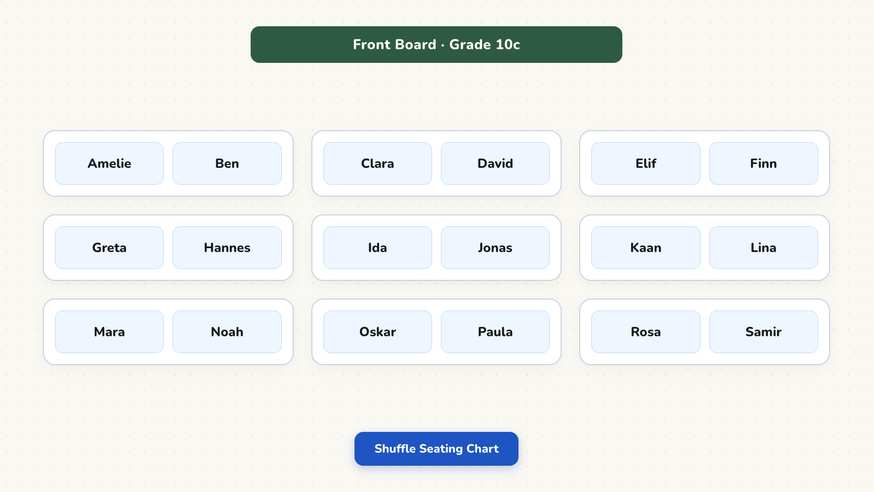
How the Classroom Seating Chart works
Step by step
- Open your ClassHelper whiteboard and select the Classroom Seating Chart tool.
- Build your room geometry by creating desk rows, collaborative tables, or a horseshoe layout.
- Enter your student roster or load an existing list from another ClassHelper tool.
- Distribute names automatically across desks or drag individuals to specific seats.
- Orient the view towards the teacher desk or board and display the chart on your screen.
Using the Classroom Seating Chart in the classroom
First day and back-to-school routines. Welcome a brand new class by displaying the seating arrangement as students enter the room. Learners quickly find their names and assigned desks without asking where to sit, establishing calm, orderly expectations from the very first minute of the term.
Exam and standardized assessment layouts. Testing days often require wider spacing and strict rows compared to day-to-day group work. Create a dedicated testing seating chart with single-desk spacing and swap to it instantly on test days without retyping student rosters.
Substitute teacher orientation. When a guest teacher enters your room, having an active seating chart projected or accessible on the screen lets them address every student by name immediately. This significantly improves classroom management and reduces disruptive anonymity.
Coordinating team tables with collaborative tasks. Pair your seating arrangement with our Group Generator to ensure collaborative project pods correspond with physical table clusters. Students see which desks make up Group A or Group B, preventing chaotic room reconfigurations.
Managing classroom dynamics and accommodations. Separate students who struggle to focus when seated side by side, and lock front-row positions for learners with visual, auditory, or learning accommodations. The digital layout lets you adjust seatings discreetly in seconds whenever classroom dynamics evolve.
Frequently asked questions about Classroom Seating Chart
Is the Classroom Seating Chart free to use?
Yes. The seating chart maker is free to use directly in your browser without requiring a subscription. You can arrange desks and place student names with zero friction.
Where is my classroom seating arrangement saved?
All seating layouts and student names are saved locally in your browser storage. If you create an account, your layouts are saved on servers in Germany. We use Stripe Payments Europe (Dublin, Ireland) to process payments. Only billing data goes there, never student or lesson data.
Can I customize desk arrangements to match my room?
Yes. You can choose classic rows, paired desks, horseshoe arrangements, or collaborative pods. Every desk can be freely moved and adjusted to match your exact classroom floor plan.
Can I automatically randomize student seats?
Yes. You can assign names randomly to open desks with a single click while locking specific students into designated seats for accessibility accommodations.
Can I rotate the view between teacher and student perspectives?
Yes. A perspective toggle switches the board orientation between front-of-room and rear-of-room viewpoints so students can orient themselves naturally without confusion.
How student and classroom data is protected is detailed in our ClassHelper privacy policy.