
Group Generator
Instant team and partner generator for collaborative learning
Organizing collaborative group work often leads to wasted minutes and social friction. Type your student roster once, select your target team size, and project balanced groups immediately on screen. Random pairings encourage diverse peer collaboration while eliminating student arguments.
“Group Generator” is a tool by ClassHelper, the free digital whiteboard for teachers. It runs directly in your browser with no account required and servers in Germany.
Gruppen direkt ausprobieren
Modus wählen, Zahl einstellen und auf Gruppen bilden tippen. Die Aufteilung erfolgt zufällig und fair direkt im Browser.
Namensliste anpassen
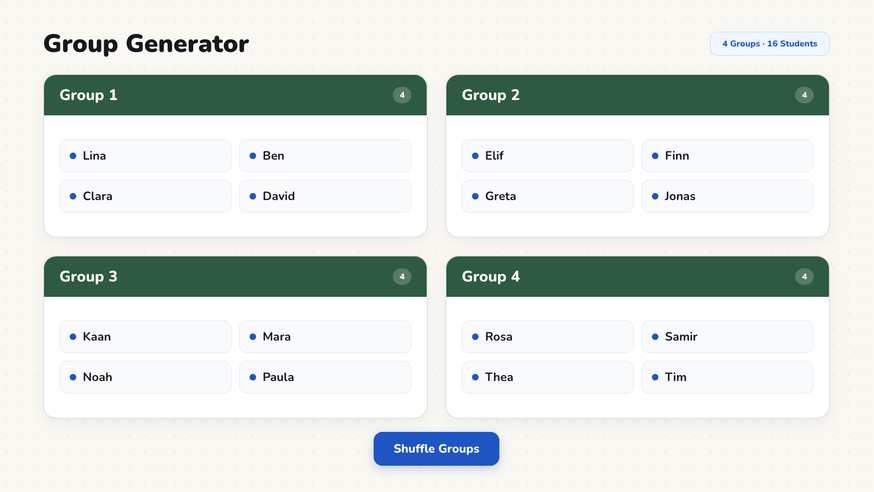
How the Group Generator works
Step by step
- Launch your ClassHelper whiteboard and choose the Group Generator tool.
- Enter your student roster, adding one student name per line.
- Select whether to group by team size (such as 4 students per group) or total number of teams.
- Configure handling for remaining students and set any required separation rules.
- Click Generate to display balanced groups side by side on your projector.
Using the Group Generator in the classroom
Learning stations and lab rotations. When setting up science experiments or reading stations, project group rosters directly on the board alongside a Timer widget. Students check the board independently to find their station group without repeated verbal announcements, saving precious instructional time.
Think-pair-share transitions. Swiftly transition from quiet reflection to pair discussions by setting group size to two. Projecting the pairings gives students immediate clarity on their discussion partner. Displaying our Work Phase widget on the same board reinforces whether students should currently work solo, in pairs, or in groups.
Encouraging diverse social interactions. In many classrooms, students naturally gravitate toward the same peer circles every day. An automated random group generator routinely mixes social dynamics, helping learners build communication skills with diverse classmates. Announcing that groups are chosen randomly reduces personal resistance.
Physical education and quick game teams. Forming balanced sports squads or quiz teams takes seconds without the social stigma of traditional team captains picking peers last. Every student sees their placement immediately, promoting an inclusive classroom culture.
Long-term project assignments. When planning multi-week group projects, generate balanced teams once and save the board layout to your teacher account. You can reload the exact team assignments in every subsequent class period without losing track of student roles.
Frequently asked questions about Group Generator
Is the Group Generator free to use?
Yes. The Group Generator is completely free to use online on any interactive whiteboard or computer. You do not need an account or subscription to create unlimited groups.
Where are classroom rosters stored?
Your student lists are stored only in your local browser cache on your machine. Any optional account data is stored securely on servers in Germany. We use Stripe Payments Europe (Dublin, Ireland) to process payments. Only billing data goes there, never student or lesson data.
How does the generator handle uneven class sizes?
If a class of 25 is divided into groups of 4, you can choose whether the remaining student joins an existing group or forms a smaller team of 3. You control this setting with one toggle.
Can I keep specific students separated?
Yes. You can define partner rules to keep certain students together or prevent specific pairs from being grouped together. The algorithm respects these constraints every time you shuffle.
Can I save my generated groups for future lessons?
Your generated groups remain on screen as long as the board stays open. With a free or Premium account, you can save your board to resume multi-week project groups at any time.
How student and classroom data is protected is detailed in our ClassHelper privacy policy.