About This Template
Structured presentation days keep audiences attentive. This template randomizes presenter order, displays evaluation rubrics upfront, tracks speech limits, and facilitates constructive peer critique.
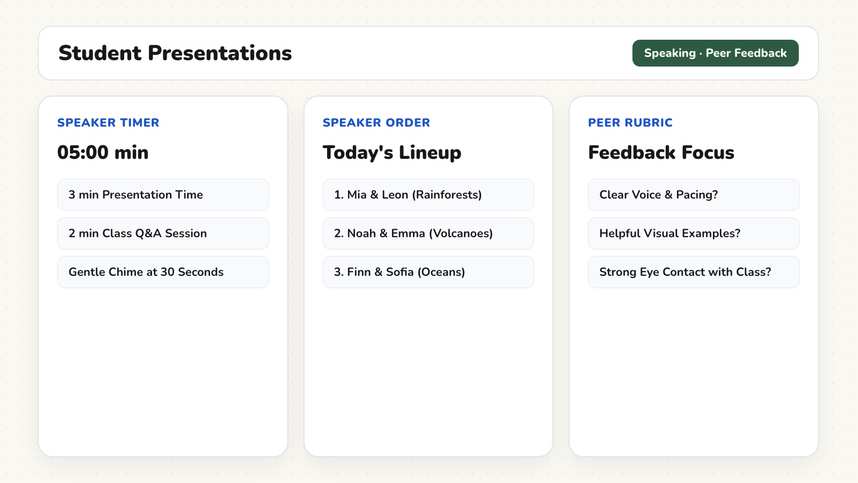
How It Works
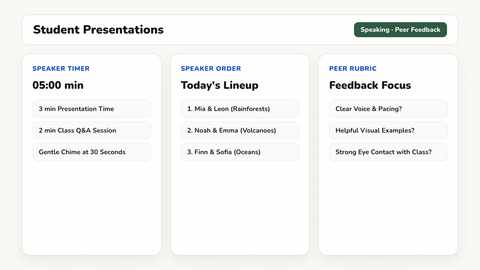
- Randomize Speaker Order (3 Minutes). The Random Name Picker determines presentation order randomly rather than following seating charts. Randomization removes the anxiety of volunteering and ensures equitable scheduling across the school term.
- Review Assessment Rubric (5 Minutes). Five evaluation criteria are projected: organization, content accuracy, vocal delivery, visual aids, and time management. Displaying expectations upfront ensures audience peers and presenters align on standards.
- Timed Presentations (10 Minutes Each). The third slide sets the Timer to ten minutes with a soft alert at eight minutes. The Traffic Light shows Red for active audience listening. The timer signals transitions automatically without teacher interruption.
- Structured Peer Feedback (4 Minutes Each). The fourth slide offers three sentence starters: one strength, one specific refinement suggestion, and one thoughtful question. Two student comments per presentation keep feedback constructive and concise.
- Session Takeaways (5 Minutes). Synthesize key insights across presentations in the Text widget so the period ends with clear collective learning.
Adaptations & Variations
In middle school grades (grades 7–8), shorten presentation duration to five minutes and encourage paired presentations. Presenting with a partner reduces public speaking anxiety during early experiences with formal presentations.
In high school grades or AP seminars, extend speaking slots to fifteen minutes and add scholarly citation requirements and audience Q&A handling to the rubric. Designate one student evaluator per presentation to write comprehensive peer review notes.
When presentations span a 90-minute block, schedule a three-minute stretch break after every third presentation and turn the traffic light to Green. Sustaining focus across more than three presentations without an intentional break leads to diminishing returns.
For the collaborative research phase leading up to presentations, explore our Jigsaw Activity template. Wrap up the presentation session using our Lesson Wrap-Up template.
Preparation
- None required. Speaker selection, rubrics, timers, and feedback prompts are fully organized.
- Enter your class roster into the name picker if you want randomized student selections.
- Adjust the presentation timer if your assignment differs from ten minutes.
- Check projection cables and digital slide compatibility before presentations begin.
Frequently Asked Questions
Are these whiteboard templates free?
Yes. All templates and all classroom tools are completely free to use without an account. Premium costs $2.49 per month and syncs your custom board layouts across devices, with the first month free. Student teachers receive permanently free Premium with verification.
Why randomize the presentation order?
Volunteering creates anxiety and debates about who speaks first. Randomization provides equitable distribution and eliminates stressful negotiation.
How many presentations fit in one period?
Three presentations fit comfortably in a 45-minute block, allowing ten minutes for speaking, four for feedback, and transition time. More than three causes audience fatigue.